Integrated Security Management System
Integrated Security Management System
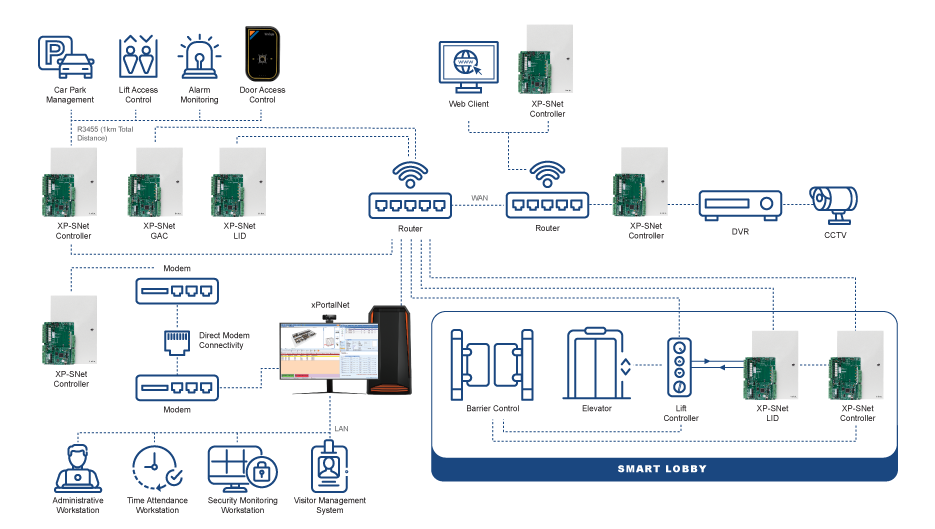
The Integrated Security Management System is specially designed with proven and reliable, advanced technology whereby the security systems like Access Control, Alarm Monitoring, Car Park Management, Time Attendance & Payroll System, CCTV System, and Lift Access Control can be linked to HR System, and this system can directly be connected to the controllers via Direct Modem & LAN Connectivity.
The core of this system is a very powerful software, providing excellent flexibility for all access applications. This system also features multiple connectivities, multiple different applications, powerful controller settings, multiple reader configurations, multiple door controllers, configurable security mode, alarm monitoring, lift control, event recording, software design with latest technology, multiple workstation, web server support, configurable remoting port, better system user control, fingerprint login checking, mobile device support, floor plan, database system, software user level control, visitor management, and a Who’s Still In report.
This system is particularly suitable for larger size installations, especially for applications requiring customization requests to tailor-make the software to suit differing, custom needs.
xPortalNet
Controller with Modem and LAN enable integration with Security Management System software (suitable for large organization that intends to integrate the security system with their existing system like HR System)
xPortalNet Features
| No | Item | Description |
| 1. | CCTV Integration | Tightly integrated to branded line of DVRs for viewing and capturing purposes. DVRs and CCTVs will be shown on the floor plan to ease identification and management. |
| 2. | Alarm Monitoring | Supports up to 512 inputs / 256 outputs / 256 LED Mimic outputs with event programming. User notification can be configured to be via client applications, email and SMS for maximum flexibility. |
| 3. | Lift Controller | Control of up to 96 floors per lift. Supports multiple lobby implementation for large scale projects. Also supports high level lift interfacing with popular lift brands for smart lobby applications. |
| 4. | Time Attendance | Comprehensive configurations to allow the maximum flexibility in shift and allowance settings. Supports multiple and overnight shifts. Allows for further customisations to suit customer’s requirements. |
| 5. | Web based Visitor Management System (VMS) | Integrated web based VMS module to enable tracking, control and recording of visitors anywhere at site using only the web browser. |
| 6. | Floor Plan | Comprehensive floor plan control to enable easy viewing and control statuses of devices. |
| 7. | Multiple Workstation | Supports multiple workstation using distributed architecture. Users can login from any workstation on the network via the client application or the web browser. |
| 8. | Web Server Support | IIS6 / IIS7 with ASP.NET allows user to login using the web browser from any part of the world. |
| 9. | Multiple Connectivity | Devices can be connected to the Server via RS232, RS485 or via LAN / WAN. Supports up to 1024 doors. |
| 10. | Mobile Device Support | Allows user login through mobile devices using the Microsoft .NET Compact Framework. |
| No | Item | Features |
| 1. | Max Door | 5 |
| 2. | Relay Output | 8 (5 for Door Relay + 3 General Purpose) Relay Rating: 1A |
| 3. | Sensor Input | 16 Supervised (As Door Status or General Purpose) |
| 4. | IP | Yes. LAN 100 Base T |
| 5. | Reader |
|
| 6. | Comm Port |
|
| 7. | Card Number Length | Up to 16 Digits |
| 8. | Max Card DB | 25,000 / 50,000 / 100,000 * |
| 9. | Max Transaction DB | 100,000 / 100,000 / 200,000 * |
| 10. | Time Zone | 255 |
| 11. | Time Set | 255 |
| 12. | Floor Zone | 255 |
| 13. | Global Antipassback | Yes |
| 14. | Interlocking | Yes |
| 15. | Access Mode | 1. Card + Pin 2. Card Only 3. Pin Only 4. Facility Code 5. Fingerprint Only 6. Card + Fingerprint 7. Pin + Fingerprint 8. Automatic Lock Release 9. Inhibit Access |
| 16. | IP Messaging Encryption | Yes. AES128. |
| 17. | Alarm Monitoring Support | Yes |
| 18. | Extension | Up to 3 Extension Board : SNet-E5D : 5 Door Extension Board SNet-E32R : 32 Relay Output Board SNet-E248S : 24 Supervised Input & 8 Relay Output Board |
| 19. | Max Extension Capacity | 5 Doors / 128 Inputs / 128 Outputs |
| 20. | Support Remote Interface Module | Yes. Use RS485. |
| 21. | Door Interface Unit (Max 10) | MK801 Reader Interface |
| 22. | I/O Controller (Max 10) | MiO-S168 – 16 Supervised Inputs / 8 Outputs MiO–R16 – 16 Relay Outputs MiO-L32 – 32 LED Driver for Mimic Panel Use |
| 23. | Max Remote Capacity | 10 Doors / 160 Inputs / 160 Outputs |
| 24. | Processor | ARM RISC Processor at 72MHz |
| 25. | Power Requirement | 12V @ 500mA (Base Board Only) |
| 26. | Onboard LED / Buzzer | Yes |
| 27. | Remote Firmware Update | Yes. Can be done through application software at site. |
| 28. | Controller Package PSU | 12VDC @ 5A with 12AH Battery |
*Depending on Model
| No | System | Software Models | |
| Minimum | Recommended | ||
| 1. | CPU (Minimum) | Pentium IV 2.4Ghz | Xeon E5506 2.13Ghz |
| 2. | RAM (Minimum) | 8GB | 16GB |
| 3. | OS | Microsoft Windows 2008 Server 64 bit |
Microsoft Windows 2008 / 2012 Server 64 bit |
| 4. | Microsoft .Net Framework v2.0 | Yes | |
| 5. | Microsoft SQL Server 2008 | Yes (at least standard version) | |
| 6. | Ethernet | Yes | |
| 7. | Serial Port | Yes | |
| 8. | Display (1024 x 768 x 16 bit colours) | Yes | |
| 9. | Mouse / Keyboard | Yes | |
| 10. | UPS (recommended) | Yes | |
| 11. | Hard disk (minimum free space) | 300GB | 500GB |
| 12. | USB Port | Required for Software Key | |
| No | Product Code | Description |
| 1. | XP-SNET5 | IP 5 Door Controller |
| 2. | XP-SNET10 | IP 10 Door Controller |
| 3. | XP-SNET-E32R | 32 Relay Output Extension Board |
| 4. | XP-SNET-E248S | 24 Supervised Input / 8 Relay Output Extension Board |
| 5. | XP-M2300i | Encrypted IP 2 Door Controller (30,000 Card Users) |
| 6. | XP-M1300i | Encrypted IP 1 Door Controller (30,000 Card Users) |
| 7. | XP-P1000i | Encrypted IP PoE 1 Door Controller |
| 8. | XP-MK801 | Door Interface Unit |
| 9. | Plato-P80S | Proximity Reader |
| 10. | Plato-P80KLS | Proximity Reader with Touch Sense Keypad & Colour LCD |
| 11. | Plato-C80S | Mifare / CEPAS Reader |
| 12. | Plato-C80KLS | Mifare / CEPAS Reader with Touch Sense Keypad & Colour LCD |
| 13. | Plato-Q80MS | QR / Mifare DesFire / ISO14443A Reader |
| 14. | xPortalNet Lite |
|
| 15. | xPortalNet Std |
|
| 16. | xPortalNet PS |
|
| 17. | xPortalNet RC |
|
| 18. | XP-GT10KL | IP 1 Door Fingerprint + Prox Reader with Touch Sense Keypad |
| 19. | XP-GT10KLABX | IP 1 Door Fingerprint + Mifare Reader with Touch Sense Keypad |
| 20. | XP-GTR1500L | IP 1 Door Proximity Reader with Touch Sense Keypad |
| 21. | XP-GTR1500LABX | IP 1 Door Mifare Reader with Touch Sense Keypad |
| 22. | XP-GT3500L | IP 1 Door Fingerprint + Prox Reader with Touch Sense Keypad |
| 23. | XP-GT3500LABX | IP 1 Door Fingerprint + Mifare Reader with Touch Sense Keypad |
| No | Documentation |
| 1. |  Product Brochure: xPortalNet v1.5 Product Brochure: xPortalNet v1.5 |